Sunday, November 10, 2024
5:38 a.m. Room 19, Hotel Malahayati
Tanjung Balai, Sumatra, Indonesia
(3,820 words)
I have absolutely no business being awake this early. However, I wasn’t able to sleep well. And lately, I’ve been developing this habit of just not fighting it. If I can’t sleep, then I don’t even try. I don’t fight it. I just get out of bed, dump some cold water on my head, make a cup of coffee and start doing stuff. And then later in the day, if I can barely keep my eyes open, I can try to take a nap. Lately, I’ve been successful with napping. That’s probably because I’ve been so tired.
It’s an interesting exercise in simply shifting your perspective. What I mean is that what just happened can be viewed in two different ways. It can be viewed as a terrible night of sleep. Or it can be viewed as a very successful nap. During the day, if people are tired, they can take a quick 30-minute nap, and they come out of it feeling refreshed and ready to go again. THAT is a successful nap. Last night, I think I finally shut off the light and closed my eyes around midnight. And then I woke up at 4:30. That is a terrible night of sleep. But if you think of it as a 4-hour nap, then it is a huge success.

So, lately, I’ve been treating these terrible sleepless nights as really successful naps. I just get out of bed and take a shower and start doing stuff. And then I go as long as I can until it’s time for another one of those power naps. Of course, physiologically, I don’t think it’s the same thing at all. The human body needs that long period of unbroken sleep. It has always struck me as incredibly inefficient and even dumb that our very existence requires that we turn ourselves off and DON’T exist for 8 hours out of each day. But, physiologically, that is how we evolved, and it’s not something you can do anything about. The body needs those 8 hours to rebuild itself. And I can feel my body starting to break down right now because I’m not getting those extended periods of sleep. You really notice it in your skin. I find that skin is very sensitive to stress and to lack of sleep, and you start to break out in rashes and feel uncomfortable all over your skin. Your eyes, of course, also start to break down. My eyes are burning right now. And I’m sure my brain is a mess. I can even see it in my typing. I’ll be typing, intending to type the word head, and then when I look back, I see that I typed the word bed instead. Head and bed rhyme, and since my brain is breaking down and the synapses are short circuiting from stress and lack of sleep, it mixes up words like bed and head simply because they sound the same.
The main reason I haven’t been able to sleep is that I have thrown myself head first into building up the Patreon project. And that is very similar to putting together a website. It is a long process that involves a lot of detail and thought. It’s like putting together a complex puzzle. And I have a tendency to focus on only one thing at a time. It would be better if I could work on Patreon for four hours and then go do something else for a few hours and then do a third thing. But I have a bad habit of getting completely absorbed in just one thing. And I can’t do anything else until it is finished. Yesterday, I started working on Patreon and YouTube as soon as I woke up, made coffee, and turned on the computer. That would have been around 4 or 5 a.m. And I worked the entire day until I turned off the light and went to bed at midnight. I stopped for a late afternoon 30-minute lunch at the fried chicken place next door, and I had mie ayam bakso at 10:30 just before going to bed. Other than that, I worked on Patreon and YouTube non-stop. It was essentially a 17-hour work shift.
An outsider might wonder how in the world you could work on those things for 17 hours. But that is how these things go. For one thing, I figured out how to change the dates on Patreon posts. This had been bothering me because my posts were not in chronological order. And I wanted to move them around to put them in the proper order. But there was no way to do that. I went looking, as I always do, for the proper instructions. And all the instructions on Patreon were quite clear. They said that I just had to click on “edit” for the post and then change the release date. And by backdating the release date, you automatically move that post into that spot in the feed chronologically. However, as is almost always the case on Planet Doug, this wasn’t possible. I could click on “edit” for a post. But in the edit window, there was no possibility of changing the date. Release date wasn’t even listed anywhere that I could see. I searched and I searched and I searched and I did research and I asked people questions. I asked people who have an active Patreon how they handled this, and they said you can’t change the date. They said that Patreon had this policy to prevent people scamming the system and going back and backdating posts. I found that very frustrating. It echoes my longstanding frustration with WordPress and online blogs in the way that it insists on showing posts only in reverse chronological order.
I can’t say for sure how many minutes or hours went into just trying to figure this out, but it went on for a long time. I eventually gave up and I composed an email to the Patreon Support Staff. I essentially submitted a “ticket”. I felt bad about doing that because an official support ticket is not supposed to be for asking simple questions about how to do things. They are meant for serious problems where something is broken. However, I was so frustrated at this point. I even copied the Patreon guideline and help documents into my email to show them where it said specifically that I COULD re-order posts by changing the release date. And yet, for me, there was no release date option. This happens all the time in the modern world of the Internet and technology. The official instructions will say you need to go to this or that page and open a certain menu and choose an item. But, for me, when I go to that page, that menu won’t be there. It’s almost always missing. Large companies seem to ignore their manuals and help documents. They make constant changes to their programs and devices, but then they rarely update the manuals to match the changes.
However, after I sent them the initial email, I wanted to include a follow-up to add more information to explain what my problem was. And to make sure that I had my facts straight, I dove back into the Patreon system one more time to carefully go over every single page and look for anything that I might have missed. And in the initial edit window, there was nothing. There was no possibility of changing the date. In fact, the date wasn’t even listed. However, there is a second page. The editing process for a Patreon post has two steps for some reason. When you click on “Edit Post”, you are brought to a page where you can edit the post contents and insert photographs and add attachments and put posts in Collections and add tags and that kind of thing.

But then you click on the “Next” button, and that takes you to a second editing page where you select your Publishing Options, such as who can see the post, who can comment on the post, and who gets notified about the post. On neither page was I given the option to set or change the date of the post. However, this time, since I was going over the page even slower, I noticed that there was a toggle switch labelled “Release Date”. I have no idea why I never saw it before this. Certainly, none of the Help documents I’d read had told me about this toggle switch. And no one I had talked to about my problem had told me about this toggle switch. But there it was. It turns out that you CAN change the release date of a post retroactively, but this feature is turned off by default. In order to access these settings, you have to turn the feature on. And you have to do this for each post individually one by one. As far as I’m aware, there is no master setting available to turn this feature on permanently for all posts. You have to toggle on the date function for each post manually. Perhaps there is a reason for this, but it seems like poor design for the UI.

I don’t know what time of the day it was when I finally stumbled across the secret toggle switch for the release date, but now that I knew about it, I could finally set about the initial task of going through all of my Patreon posts and adjusting the dates so as to put them into the proper order.
It’s tragic that my life usually follows this pattern. I wake up with a goal or a task that I want to accomplish. Then 50% of the day is spent fixing a problem with the technology you need to even start that task. Half the day is gone and I haven’t even started doing the thing I wanted to get done. All I managed to do was troubleshoot and fix a problem with the underlying technology. I often use the analogy of a carpenter or other construction worker. A carpenter might wake up in the morning and his job for the day is to drill 500 holes and assemble something. But then he discovers that his drill won’t turn on. And he spends the entire day trying to figure out what’s wrong with the drill. And no holes get drilled. YouTube is like that for me. I wake up each morning with the goal of shooting, editing, and uploading videos. That’s my job – to make videos. Yet, the entire day will disappear in hours of background hassle as I try to fix a technology problem. And I have to fix that problem before I can even start on the main job of making videos. So you lose the entire day, and you wake up the NEXT morning to finally make those videos. But on that morning, there is a new problem that needs to be fixed. It never ends.
Another big job I tackled yesterday was to organize my existing posts into Collections. I didn’t know anything about how Collections worked on Patreon. So I first had to do the research to learn how this feature works and whether I even wanted to use it. It seemed simple enough, and it looked like it would be extremely useful. The idea is that a Patreon can consist of a wide variety of post types. They can consist of different types of media, and, of course, they can have different subjects. But all of them just get dumped into the main feed. And Collections offers a way to group them to make them a bit more searchable and scannable and comprehensible.
In my case, for example, I’ve already created a few different categories of posts, and yesterday, I created a separate Collection for each one. So far, this is what I have for my Collections:
- Planet Doug Journal – 2024
- Behind-the-Scenes Videos
- The Blue Dot (Google Maps)
- Video Slideshows
- Relive 3D Animated Maps
- Extended Video Cuts
- Photo Posts
There will be more that I develop over time, I imagine, but that is what I have right now. And creating each Collection took time. It’s not as simple as just typing those words. You also have to write a description of each one. And that takes time and thought to get it right. And you have to make a thumbnail image that represents each one. And that took a lot more time. For example, what kind of thumbnail would you use for a Planet Doug Journal post like this one? I had to make a cup of coffee, sit down, and really ponder that for a while. And then I went searching through all of my own photographs trying to come up with an idea. And I eventually settled on something that I think works out okay. I happen to have digital scans of all the pages of a handwritten journal that I kept on my bike ride in Guinea. So I took one of those scans and I cropped it and resized it to the proper dimensions for this thumbnail. That also takes time. And then I added some text to the image. I put a sample of a date. And then I added a text box with the words “Dear Diary…”. Of course, I never start my journal entries with Dear Diary or any such cliche. But that phrase is a pretty clear shorthand for indicating that this is a journal entry. And that’s the thumbnail that I used.

As is obvious, this thumbnail didn’t just suddenly appear. I’m no graphic artist, and it took me a long time to finish it, and I went through several versions until I landed on the final one that I used. I did all of this work on one of my phones. And then I had to save the final graphic on my phone and then copy it to a flash drive so that I could then copy it over to my laptop so that I could finally insert it into the Collections section of Patreon.
And even then, my work wasn’t done. I had created the Planet Doug Journal Collection, but now I had to add all the journal posts to the collection. And that led to more problems and things I had to figure out. I think there is an issue with the Patreon UI here because not all of my Patreon posts would show up. It should have been an easy task. You can click on a button to “Add Posts to Collection” and then you should be presented with a list of all your posts, and then you select the ones you want to add by ticking a box. However, I got only a partial list of posts. And there was no way to keep scrolling or go to another page to see the rest of them. The system showed me a few posts but not all of them. So now I was faced with the task of going into my main Patreon feed and going through all of it and trying to figure out which posts had been added to the Collection and which hadn’t. And adding each post manually was a laborious process where you had to open up the full post for editing and then go through the editing pages and add the post to the Collection and then resave it. And you had to do this for every post. And you couldn’t even do them quickly because every time you saved the post, you were not returned to the same place in the Patreon feed. You were kicked out and ended up all the way back at the beginning each time. And then to get to the next post, I had to scroll all the way back down and keep hitting the “Show More” button over and over to finally return to where I was previously. Then I could select the next post, edit it, add it to the Collection, save the changes, and then I’d be kicked out again and go all the way back to the beginning, and I had to go through the same long and agonizing procedure again of scrolling through the entire feed and reloading page after page to finally locate the next post. It was just awful and so laborious and time-consuming. Maybe I missed something, but it struck me as terrible UI again.
Everything I just described was only to create the Planet Doug Journal Collection. I had six more post types, and I repeated all of that work for all of the six remaining Collections that I needed. I like the Collections feature, and I’m glad I spent the time to set it up. And it’s one of those features that you really want to get going at the very beginning. Once the foundation is laid, it becomes easier later on. Now that I have a base set of Collections, I can easily add each new post to its appropriate Collection as I create them. If you didn’t do it at the beginning and you had months or even years worth of random posts in your Patreon, and THEN you decided to put them all in Collections, it would be a huge job. You’d probably never do it because it would be too much work. But as glad as I was to do it now and get it done, it required most of the day.
I still wasn’t done with my work, though. I’d done a lot: I’d figured out how to toggle on the Release Date feature; I’d put all my posts into the proper chronological order; And I’d created a set of Collections and sorted all of my posts into the appropriate Collection. But then I stumbled across the fact that I could insert pictures into my Patreon posts. Up until yesterday, I’d assumed that this wasn’t possible. I assumed that because on the Post editing page, there is no menu or system anywhere for adding pictures or graphics. In fact, there are practically zero formatting options of any kind. I’m accustomed to something like the WordPress editing page where you are presented with dozens of sections where you can insert photos, add formatting, and add thumbnails, etc. Everything is just laid out in front of you with a separate section and a separate menu. But on the Patreon editing page, there is nothing like that. There is a place to put the Title and a place to put the content. And at the bottom, there is a button that allows you to attach a file. But that’s it. It’s a very simple page. So I just assumed it was impossible to insert photographs. That struck me as odd, but I guessed that was how Patreon worked.
But then as I was working on Collections and adding posts to my Collections, I noticed this little graphic kept popping up on the left hand side of the screen when my mouse hovered over that area. It was tiny and it showed up for just a short time. But when I examined it, I realized it looked like a tiny camera. And when I clicked on it, it opened up a menu for adding photographs to the post. I couldn’t believe it. I have no idea why this very powerful and very useful feature is hidden like that.
Once I realized that I could click on this camera icon to insert a photograph, I had to go down the deep rabbit hole of figuring out how it worked. Nothing like this is ever simple, and the only way to figure out how it works is to just do it multiple times and start experimenting. For one thing, you have a choice between uploading a photo from your device or having the photo hosted somewhere else online and inserting it with the URL or an embed code. And, so, I had to figure out how that worked. I use an online hosting website called SmugMug for storing photographs, and I had to spend a lot of time testing all the various link and embed codes that I could use until I finally found the one that worked. There were a lot of ins and outs to this whole process, and I methodically went through all the options and possibilities until I had it figured out.

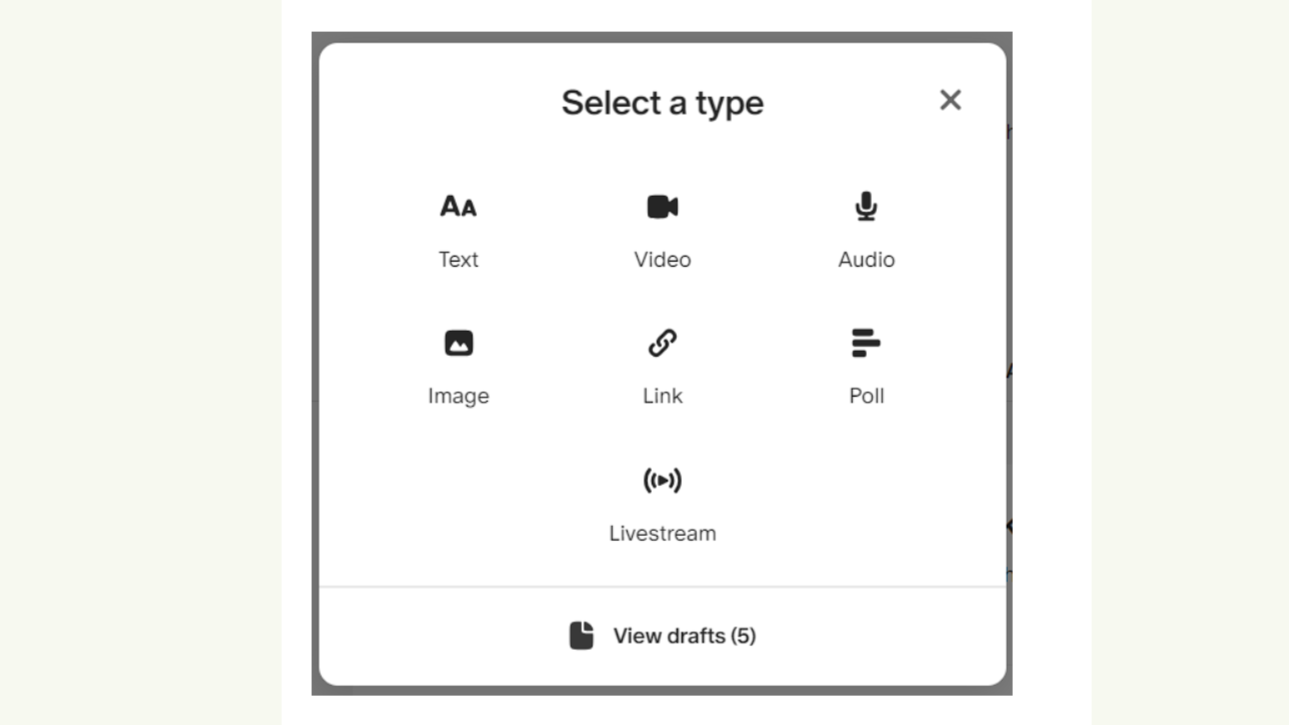
On top of all that, I also took a deep dive into figuring out how to use the Patreon Image post. When you create a new Patreon post, you have a choice among the following options:
Text
Video
Audio
Image
Link
Poll
Livestream

So far, I have been using the Text and Video types and learning how they worked. But I also wanted to be able to create simple posts of just pictures. I think of those photo posts like an Instagram post or something like that. And I guess this is a fairly simple procedure, but it also took some time to figure out. I have created only one Image post so far. I made an Image post with five or six screenshots taken from the video of my haircut. And I figured out how to add captions to each photo.
And I guess that is as far as I’ve gone. I haven’t done an Audio post, a Link post, a Poll, or a Livestream yet. I guess I’ll figure those out eventually. I’m particularly interested in the Audio post. I figured out that I can record an audio file and upload it as an attachment to the other posts. But these audio files can’t be played on Patreon. The only way to play them is to download them to your device and open and play them there. So that isn’t ideal. I assume that the dedicated Audio post allows the uploaded audio to be played on the Patreon site. I’ll probably test that today.
Overall, I’m pleased with my progress on Patreon. I think I have enough content on the Planet Doug Patreon that I could comfortably launch it now. People visiting the site would be able to get an idea of what it is all about. However, I still have to create the actual tier structure. And that is an ongoing challenge. I’ve played around with all kinds of different approaches and styles, and I’m still not clear on what is best. That is something that will definitely evolve over time, but I need to come up with a starting point. There are a lot more things on Patreon that need to be set up, but they aren’t available unless you have created a paid tier. That is my next big task.